


e-PAN Card - What It Is and How to Download It
In the context of digital taxation, it is important to know how to download your e-PAN Card, especially for those who file taxes online. An e-PAN is simply the digital version of the physical PAN Card. After applying for an Instant e-PAN Card, you can receive it within 48 hours at no cost. However, you can easily use the PAN Card download facility and use e- e-PAN Card as a Valid document

How to Download e-PAN Card via UTIITSL
For those who applied through UTIITSL ,e-PAN Card download done through UTIITSL website.
Step 1 - Visit the Official Website UTIITSL.
Step 2 - click 'Click to Download' under 'Download e-PAN.
Step 3 - Enter your PAN, date of birth, GSTIN (if applicable), and submit.
Step 4 - Receive a link on your registered mobile or email.
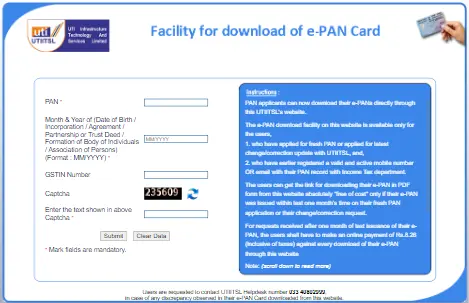
Step 5 - Click the link, authenticate with an OTP, and download your e-PAN Card.
How to Download e-PAN Card via Protean (formerly NSDL)
If you've applied for a PAN through Protean and need to download the e-PAN or Protean PAN Card download there are two options to download the e-PAN Card
By Name and Date of Birth .
Step 1 - Visit the Protean portal and go to the PAN Services link.
Step 2 - Click on 'Request for e-PAN/ e-PAN XML (PANs allotted in last 30 days) option, and the "Get e PAN Card" page will be opened
Step 3 - Provide your PAN, Aadhaar, date of birth/incorporation, and captcha.
Step 4 - Generate and enter the OTP, validate, and download the secured PDF. If your free downloads are exhausted, opt for the paid e-PAN download facility.
Check - PAN Card Link to Aadhar Card
How to Download e-PAN Card by Name and Date of Birth
You can download your e-PAN Card via name and date of birth through official websites of the (NSDL) Protean
- Go to the official website of Protean (Formely NSDL) Protean
- On the NSDL website, you can choose the option ‘PAN’ or ‘Acknowledgement Number’ and enter your date of birth, GSTIN (if applicable), and captcha. On the UTIITSL website, you need to enter your PAN number, date of birth, and captcha.
- You can select any mode from the options given to get the OTP
- You need to enter the OTP and download the e-PAN Card
How to Download e-PAN Card by Acknowledgement Number
- Visit NSDL website.
- select the ‘Option ‘Acknowledgement Number’ and other necessary details.
- Enter the Captcha code and click on submit.
- You can download your e-PAN Card.
How to Download e-PAN Card by Registered Mobile Number
You can easily download an e-PAN with your registered mobile number. Given below are the steps on how you can download it:
- Visit the official website of NSDL Protean or UTIITSL
- On the NSDL website, select the ‘PAN’ or ‘Acknowledgement Number’ option and enter your date of birth, GSTIN (if applicable), and captcha. On UTIITSL website, enter the PAN number, date of birth and captcha.
- From the given methods, you can choose the option “Mobile Number” to get the OTP.
- After filling in the OTP, you can download your e-PAN Card.
How to Download e-PAN Card via Income Tax e-Filing Website
For individuals who applied for an instant e-PAN through Aadhaar on the Income Tax e-filing website:
Step 1 - Visit the official income tax e-filing website.
Step 2 - Click 'Continue' under 'Check Status/Download PAN.'
Step 3 - Enter your Aadhaar number and proceed.
Step 4 - Authenticate with the Aadhaar OTP, check the status, and download the e-PAN when allotted.
Also : Download Instant E PAN Card through Aadhaar Card
What is an e-PAN Card?
An e-PAN Card is a digital version of a PAN Card, which serves as a unique identification number for taxpayers in India. It is issued electronically by the Income Tax Department and can be downloaded in PDF format. The e-PAN has the same details as a physical PAN Card, such as your -
- Permanent Account Number (PAN Card)
- Name
- Date of Birth
- Father's Name
- Gender
- Photograph
- QR Code
- Signature
Benefits of having an e-PAN Card
The digital PAN Card has many benefits for individuals. These are as follows:
- You can get your e-PAN Card easily and instantly, as you do not need to wait long for a physical card.
- The e-PAN Card is environment friendly as there is no use of paper or plastic.
- You can download an e-PAN Card multiple times from the official website.
- You can store your e-PAN Card on your smartphone or laptop; this helps in reducing the risk of losing it.
Required Details to Download e-PAN Card Online
To download the e-PAN Card, you must know the given below information:
- Date of Birth
- Registered Mobile Number or Email Address to access OTP
Downloading your e-PAN Card is a quick and easy process. You can download PAN Card online via NSDL, UTIITSL, or the Income Tax e-Filing portal .
How to Print e-PAN Card?
Follow the steps given below to print e-PAN card:
Step 1 - You need to go to the Protean portal.
Step 2 -Fill in all the required details such as PAN, Aadhaar number, date of birth, captcha code, then submit.
Step 3 - You need to complete OTP verification process.
Step 4 - You will have to pay the applicable fee and submit the request.
Once the process is complete, the printed PAN card will be dispatched to your registered address.
What is e-PAN Card fees?
Applying for an instant e-PAN through the Income Tax e-filing portal is completely free of cost. However, if you apply for an e-PAN through the NSDL or UTIITSL websites, the charges are as follows:
- Application submitted at TIN facilitation centers, PAN centers, or online using physical document submission: ₹72 inclusive of taxes.
- Application submitted online through paperless mode: ₹66 inclusive of taxes.
Password for Downloading e-PAN Card
When you download your e-PAN Card via official websites such as NSDL, UTIITSL, or Income Tax then you need to put the password to access the secure PDF e-PAN file.
- The password to open the e-PAN Card PDF is your date of birth in the format DDMMYYYY.
- For example, if your birth date is 1 January 1990, then the password will be 01011990.
- The format should be correct to avoid any kind of errors and to access the PDF file easily.
How to Track e-PAN Card Application Status?
The process that must be followed to check the status of the e-PAN is mentioned below:
- Select ‘Instant E-PAN'.
- Select ‘Check Status/Download PAN’.
- Enter the Aadhaar number.
- Select ‘Continue’.
- The e-PAN status will be displayed.
Check - PAN Application Process
e-PAN Card Eligibility
The below-mentioned criteria must be met in order to apply for an e-PAN:
- You should have an Aadhaar Card.
- The details mentioned on the Aadhaar Card must be up to date.
- Your mobile number must be linked to the Aadhaar Card.
- You should not have a PAN.
- You should be an individual taxpayer.
- You should be an Indian citizen.
Documents Required to Download e-PAN Card
Given below are the documents you will require to download your PAN Card. They are:
- Your updated Aadhaar Card.
- Updated proof of address such as Aadhaar, utility bill, voter id, etc.
Details Mentioned on an e-PAN
The below-mentioned details are mentioned on the e-PAN:
- PAN number
- Your name
- Your date of birth
- Photograph
- QR Code
- Gender
- Your father's name
- Signature
FAQs on e-PAN Card Download
- How long does it take to receive e-PAN?
It takes 10 to 15 days to issue the e-PAN and approximately 48 hours to obtain the e-PAN after completion of the online application and verification of documents.
- How many times can we download e-PAN Card?
E-PAN can be downloaded three times free of cost for the PAN applicants who submitted the applications within last 30 days as confirmed by Income Tax Department,
- How can I download my e-PAN for free?
You can click on the link https://www.pan.utiitsl.com/ where you will have to provide details such as your PAN number, date of birth, followed by the captcha. Click on ‘Submit’ to download your e-PAN.
- Is e-PAN a valid proof of PAN?
Yes, the e-PAN acts as a valid proof of PAN. All the relevant details mentioned on the PAN are mentioned on the e-PAN as well.
- Should my Aadhaar Card be active to apply for an e-PAN?
Yes, your Aadhaar Card must be active to apply for an e-PAN.
- Is there an expiry date of e-PAN Card?
No, there is no expiry of e-PAN. The digital version of PAN is valid for a lifetime and can be used for various financial and government activities.
- Is e-PAN equally valid as hard copy of PAN?
Yes, e-PAN and physical form of PAN are equally valid for all types of banking and government activities such as filing income tax returns.
- Will I need to pay a fee to apply for an e-PAN Card?
No, you will not have to pay a fee to apply for an e-PAN.
- Will I need to submit a scanned copy of the signature and photograph to complete e-PAN Card KYC?
A scanned copy of the photograph and signature need not be submitted to complete e-KYC.
- Will I need to submit any physical documents when applying for an e-PAN Card?
No, you do not need to submit any physical documents when applying for an e-PAN Card.
News about e PAN Card
Income Tax Rules 2026 : Revised Limits for Cash Deposits, Withdrawals and Property Deals
A revised set of draft income tax requirements have been released by the Income Tax Department; once they are completed, they will take effect for the fiscal year 2026–2027. The draft income tax rules include modifications that will affect how you pay income tax, withdraw cash, pay in cash, and more, as well as the necessity to quote your PAN card number for a variety of transactions. The administration has asked stakeholders to submit feedback by 22 February 2026, following the publication of the proposed rules. Following a consideration of the responses submitted, the new regulations will be approved, publicly revealed, and scheduled to take effect on 1 April 2026. Current regulations require that PAN be provided when depositing more than Rs. 50,000 in cash during a single transaction at a bank or post office.

Karishma VP has over a decade of experience in content writing which includes over five years specializing in personal finance. Her career in BankBazaar has given her the opportunity to write on a wide variety of financial products ranging from credit cards and home loans to insurance policies and government schemes. She believes that an understanding of personal finance is an important step to leading an independent, empowered life. This has led to her being passionate about learning more about the BFSI sector and writing about personal finance as clearly, concisely, and accurately as possible to make it accessible to a larger audience through BankBazaar.

Disclaimer
Credit Card:
Credit Score:
Personal Loan:
Home Loan:
Fixed Deposit:


Copyright © 2026 BankBazaar.com.