


What is e-Aasthi? How to View your Property Listing
The Bruhat Bengaluru Mahanagara Palike (BBMP) has introduced e-Aasthi, a digital platform designed to simplify property record management in Bangalore. Unlike the traditional e-Khata, which focuses primarily on issuing Khata certificates for property owners, e-Aasthi offers a more comprehensive system. The previous Khata version had 18 information types, while e-Aasthi includes 46 types of property details.
What is e-Aasthi?
e-Aasthi is a digital platform by the Bruhat Bengaluru Mahanagara Palike (BBMP). It streamlines property record-keeping and ensures transparency in transactions. The portal allows property owners to access, verify, and manage their details online. It digitises and centralises property details, reducing reliance on physical documents. This system prevents illegal transactions, removes intermediaries, and provides easy access to property documents.
You can use the e-Aasthi portal to:
- Track or check property ownership details
- Check the status of property tax co-payment
- Update property transactions
- View property listings
- Apply for e-Aasthi by filling out the online application and uploading the required documents.
Benefits of e-Aasthi
The key benefits of e-Aasthi are as follows:
- Transparency and Reduced Corruption: Every transaction is recorded digitally, reducing the possibility of corruption by ensuring transparency in property dealings.
- Real-Time Application Tracking: Users can easily track the status of their applications, requests, and inquiries, ensuring transparency and eliminating delays.
- Prevention of Illegal Transactions: The platform reduces illegal property transactions by offering verifiable and accurate records, thus decreasing property disputes.
- Efficient Property Tax & Khata Management: Property tax details are easily accessible, and the system ensures strict khata implementation, improving regulatory adherence.
- Faster Loan Processing: Centralized and efficient document verification enhances the loan clearance process, making property transactions faster.
- Direct Interaction with BBMP: Citizens can engage directly with BBMP, bypassing intermediaries, which ensures a more efficient and transparent service experience.
- Enhanced Data Accuracy & Error Reduction: The electronic storage of property data reduces errors and improves data integrity, making property records more reliable.
- Increased Control and Convenience for Property Owners: e-Aasthi gives users greater control over property management and related issues, with convenient access to documents stored in Digilockers at no cost.
How to view your property listing on e-Aasthi?
Follow these step-by-step instructions to check your property details on the e-Aasthi portal:
- Step 1: Visit the Official Website. Open your browser and go to the e-Aasthi portal.
- Step 2: Enter your registered mobile number. You will receive an OTP (One-Time Password) on your phone. Enter OTP to log in.
- Step 3: Once logged in, click on the ‘Get e-khata’ tab on the homepage. This will take you to a page displaying the list of zones and wards under BBMP.
- Step 4: Identify your ward from the list provided. Click on your ward to access a property listing specific to that area.
- Step 5: Search for Your Property. You will see two search options:
- By Owner Name: If you are visiting the site for the first time, search by your name as listed in the khata records.
- By e-Property ID: If you already have your draft e-khata or the new e-property ID, use this option.
- Step 6: If the search does not show your property, scroll through the list of properties in your ward. The names are arranged alphabetically, making it easier to find yours.
Note: If your property details are not yet listed, revisit the portal after a few days. BBMP is still digitising some property records, and updates are ongoing.
How to Apply for your Final e-Khata?
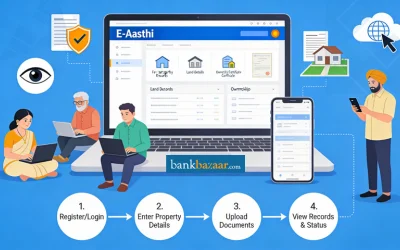
To apply for the final e-Khata using the Aasthi portal, follow these steps:
- Step 1: Go to the official e-Aasthi website where you can apply for the final e-Khata.
- Step 2: If you have already submitted your draft e-Khata, verify if it is available on the portal. If not, proceed to submit the final e-Khata application.
- Step 3: On the portal, click on the option to ‘Submit information for final e-Khata’. This will start the application process for the final e-Khata.
- Step 4: Provide sale deed details:
- For Properties Registered After 1 April 2004: Enter the registration number of the sale deed. The system will automatically fetch the sale deed details from the Stamps and Registration Department’s Kaveri 2.0 portal.
- For Properties Registered Before 1 April 2004: If your sale deed is not digitised, you will need to upload a scanned copy of the sale deed (or any other title document such as a gift deed, etc.). Ensure that the document is registered with the Stamps and Registration Department.
- Step 5: Upload the EC to the e-Khata application form within seven days of issuance.
- The EC should be dated between the day before your sale deed registration and the current date. Apply for the EC through the Kaveri 2.0 portal.
- If the property transaction occurred after 1 April 2004, the EC should be received within three days. Otherwise, it may take longer.
- Step 6: Submit documents that verify you have an A-Khata. These could include a Khata certificate, Khata extract, or any other relevant documents.
- Step 7: Enter Property Tax Details. Include your SAS application number (if applicable) and any other property tax-related information required.
- Step 8: Provide the following personal details:
- PAN Number: Enter your PAN number.
- Aadhaar eKYC: Complete the eKYC process using your Aadhaar.
- Your photo: Upload a recent photograph of yourself.
- Property Photo: Upload a clear image of your property.
- Step 9: You can either manually input or select the GPS coordinates for your property from the website.
- Step 10: Enter your 10-digit BESCOM (Bangalore Electricity Supply Company) connection number.
- Step 11: Carefully review all the details provided. Once verified, submit the application.
- Step 12: After submission, you should receive confirmation of your application. The final e-Khata will be processed based on the details provided.
Verification Process for an e-Khata
When you submit your application, it is automatically verified on the e-Aasthi website, which is linked with the Kaveri and BESCOM databases. The website provides an option to save your application progress, allowing you to return and complete it at a later time
- Step 1: If the details match, you will receive your e-khata immediately. If there is any mismatch, your application will be forwarded to the ARO (Assistant Revenue Officer). The ARO will notify you about the mismatch and inform you of any corrections required.
- Step 2: The ARO and the caseworker will also review the applications of properties for which digitised records have not yet been verified.
- Step 3: If a property owner lacks the necessary documents, they can visit the e-khata help desk at the ARO’s office for further assistance.
- Step 4: BBMP has not set a specific deadline for citizens to apply for e-khata. As a result, most current applications are from individuals who require e-khata for property transactions.
Note: Alternative Process for NRI Applicants: On 9 October 2024 BBMP issued an e-khata to an NRI who did not possess an Aadhar card. In such cases, the application is processed using an alternative login available to caseworkers.
Stepwise Process: When You Don’t Have a Khata for Your Property
You can do the following if you dont have a khata for your property:
- Identify the property’s status – Properties may not have a BBMP khata due to being in old village records.
- Check if the property falls under the 2008 merger – Properties before 2008 remain in village records, while those after 2008 are in BBMP registers.
- Confirm tax payments – Despite being in old records, owners may still pay taxes to BBMP.
- Verify the property on e-Aasthi – Check if the property is listed; if not, further steps are needed.
- Understand the outdated records – Properties without a khata often have outdated, unreliable records.
- Follow the alternative process – Properties without khatas follow a different procedure for khata registration.
- Wait for the new module – A new module will be launched for these property owners to file applications.
- Provide necessary documents – BBMP will issue A or B khatas based on the sale deed and other submitted documents.
Features of e-Aasthi
The important features of e-Aasthi are as follows:
- Digitized Property Transactions & Records: E-Aasthi centralizes all property transactions, making property records accessible online. Property owners can easily generate and access records from the current khata database with a unique Property Identification Number (PID).
- Automated Updates and Verification: Any necessary updates to property records are automatically processed, and property verification is simplified, reducing manual intervention.
- Geographic Information System (GIS) Integration: The platform integrates with GIS software for accurate property mapping, ensuring precise location-based data.
- Aadhaar-linked Online Application: The application process is initiated through the property owner's Aadhaar-linked mobile number for secure and streamlined registration.
- Digital Signature and Record Issuance: Property records are digitally signed and can be issued instantly when requested by citizens, with the option to obtain a hard copy for Rs.125.
- Grievance Tracking & New Property Record Creation: A formal channel is available for registering and tracking grievances related to property records. New properties can also be registered on the platform.
How to Download the e-Aasthi Certificate
To download your E-Aasthi certificate, follow these simple steps:
- Step 1: Visit the Official website.
- Step 2: Enter your ward name and number, which can be found on your property tax receipt. Also, provide Property Tax and Aadhar Details along with your 10-digit BBMP Property Tax Application Number and complete Aadhar-based e-KYC.
- Step 3: Upload Required Documents
- Provide your Registered Deed Number.
- Upload the Encumbrance Certificate (EC).
- Upload a recent photograph of the property.
- Provide your 10-digit BESCOM Account Number.
- Step 4: After uploading all the required documents, visit the ARO office for verification.
- Step 5: If everything is in order, your E-Aasthi certificate will be issued within a day.
How to Check E Aasthi Status Online
To check your E-Aasthi status online, follow these simple steps:
- Step 1: Open your browser and go to the e-Aasthi portal.
- Step 2: On the portal’s homepage, you will find a section to enter your mobile number. Make sure this is the number registered with BBMP or linked to your property.
- Step 3: After entering your mobile number, you will receive an OTP (One-Time Password) on your phone. Enter the OTP in the required field on the portal.
- Step 4: You will be asked to complete a Captcha verification to confirm you're a human user. Type in the characters or numbers shown in the Captcha box.
- Step 5: Once you have entered the OTP and Captcha correctly, you can proceed to log in to the portal.
- Step 6: After logging in, you will be able to view the current status of your E-Aasthi application. This will show if your certificate is issued or still in progress, along with any updates on your property or tax details.
e-Aasthi transforms property management in Bengaluru with a digital, transparent system. It streamlines record-keeping, integrates GIS mapping, and ensures real-time updates. The platform offers a more efficient and accessible process for property owners, setting a new standard for BBMP services.
Here is a table comparing between e-Khata and e-Aasthi:
Feature | e-Khata | e-Aasthi |
Primary Purpose | Issuance of Khata certificates | Comprehensive property record management platform |
Number of Information Types | 18 types | 46 types |
Core Functionality | Records property ownership and tax details | Manages detailed property records, transactions, and documents |
Platform Features | Khata certificate issuance, tax payment | Real-time tracking, GIS integration, property verification, grievance tracking |
Access to Documents | Basic property tax and ownership details | Easy access to a wide range of documents and updates |
Transparency & Tracking | Limited tracking features | Real-time updates, enhanced transparency, prevents illegal transactions |
Scope | Focuses on basic property registration and tax details | Includes property ownership, transactions, tax status, GIS mapping, and more |
GIS Integration | Not available | Available for precise property mapping |
Target Users | Property owners needing Khata certificates | Property owners, buyers, and sellers managing comprehensive property records |
Verification | Basic verification of Khata records | Automated updates, real-time verification with integrated systems |
FAQs on e-Aasthi BBMP
- What should I do if my property details are missing or incorrect on the e-Aasthi website?
If your property is not listed or there is incorrect information, check again after a few days as the data is still being updated. For discrepancies, file a written objection within 7 days of the draft e-Khata publication.
- Who can apply for an e-Khata through e-Aasthi?
Only property owners with an A or B khata can apply for e-Khata via the e-Aasthi website. The platform allows these owners to upload additional details to generate their final e-Khata.
- How do I apply for an e-Khata via e-Aasthi?
To apply, visit the official website of BBMP e-Aasthi. Log in with your phone number and upload the required documents. After submission, the platform will automatically generate your e-Khata, and you can download it by paying a Rs.125 fee.
- What information is shown on the draft e-Khata on e-Aasthi?
The draft e-Khata contains basic details such as the property owner’s name, location, property extent, and the Property Identification Number (PID). This data is based on the BBMP’s existing khata records, and further information will need to be filled in by the property owner during the application process.
- How can I correct errors in the draft e-Khata?
If you spot any errors, such as misspellings of names, you can raise an objection within 7 days of the draft e-Khata being published. The objection must be submitted in writing to the Assistant Revenue Officer (ARO), along with supporting documents. The ARO will then review and make corrections as necessary.
- Can I apply for an e-Khata without all the required documents?
If you are missing any documents, you can visit the e-Khata helpdesk at the ARO’s office for assistance. In some cases, the ARO may process applications manually, such as for NRIs or people without Aadhaar cards.
- What should I do if I cannot access the e-Aasthi website or my property details?
If you're facing issues accessing the website or your property details, try visiting the ARO’s office or the helpdesk for assistance. The BBMP also provides support for resolving technical issues with the platform.
- How do I apply foran e-Khata if my property is not listed under an A or B Khata?
For properties that do not have an A or B Khata, a separate module will be available soon on the e-Aasthi website to submit an application for the issuance of a Khata. This process will apply to properties in merged villages or those without digitised records.
- Is the e-Khata information publicly accessible?
Yes, draft e-Khatas are publicly accessible on the e-Aasthi platform for transparency purposes. However, they do not show personal details like phone numbers or sensitive data, ensuring privacy while promoting openness.
- What happens if my property has errors or discrepancies on the e-Aasthi website?
If there are discrepancies, you can file a written objection to the ARO within 7 days. For errors such as incorrect names or addresses, corrections will be implemented via a separate update module, which will be available in the near future.
- What if my property is in a village area or outside BBMP records?
For properties in areas merged with BBMP after 2008 or those lacking a BBMP Khata, a special module will be available soon on the e-Aasthi website. These property owners can apply for an A or B Khata by submitting the required documents.
- Can I apply for e-Khata if my sale deed is not available digitally?
If your property’s sale deed was registered before April 1, 2004, and is not available on Kaveri 2.0, you will need to upload a scanned copy of the sale deed. The e-Aasthi platform allows you to upload title documents for properties registered before this date.
- How long does it take to get my final e-Khata after applying on e-Aasthi?
After you submit the required information, the application will be processed. If there are no mismatches, the e-Khata will be generated immediately. In case of discrepancies, the ARO will contact you for corrections, which may delay the process.
- Can I apply for an e-Khata without a GPS coordinate?
No, GPS coordinates are required as part of the e-Khata application. You can select your property’s coordinates on the e-Aasthi website.
- When is e-Khata mandatory for property transactions?
Starting from October 2024, e-Khata is mandatory for property transactions in Bengaluru. All property transactions, including registration and mutation, require an e-Khata. Ensure your e-Khata is verified by the ARO before proceeding with any transaction.

Karishma VP has over a decade of experience in content writing which includes over five years specializing in personal finance. Her career in BankBazaar has given her the opportunity to write on a wide variety of financial products ranging from credit cards and home loans to insurance policies and government schemes. She believes that an understanding of personal finance is an important step to leading an independent, empowered life. This has led to her being passionate about learning more about the BFSI sector and writing about personal finance as clearly, concisely, and accurately as possible to make it accessible to a larger audience through BankBazaar.

Disclaimer
Credit Card:
Credit Score:
Personal Loan:
Home Loan:
Fixed Deposit:


Copyright © 2026 BankBazaar.com.