


APAAR ID Card - Full Form, How to Register, Benefits & Download Guide
The APAAR ID card is a distinct digital academic identification developed by NEP 2020 to securely store and manage student information across institutions. APAAR ID stands for Automated Permanent Academic Account Registry. Understanding how to give APAAR ID easy access to digital academic records using Digi Locker.

Key Highlights of APAAR ID card
- A 12-digit permanent student ID that stays throughout your academic journey.
- Part of the Government of India’s APAAR (Automated Permanent Academic Account Registry) initiative.
- Linked with DigiLocker, where you can access and download your APAAR ID and records.
- Stores important academic documents like marksheets, certificates, degrees, and scholarships in one secure place.
- Parental consent is required for students below 18 years; the school provides a consent form, or parents can download it from the PAAR portal.
- Completely free to register with no charges for students or parents.
When you need help, feel free to reach out on the official APAAR helpline 1800 889 3511, which is free and available on all days.
APAAR ID Full Form
APAAR ID stands for Automated Permanent Academic Account Registry. The Government of India established the Academic Bank of Credits (ABC Bank) to issue APAAR ID cards. This card functions as an education ecosystem register, often known as an EduLocker.
What Information Does APAAR Store?
Instead of just being an ID number, your APAAR profile acts like a structured digital record of your entire academic journey. It pulls verified data from schools, boards, and institutions, and makes it accessible through platforms like DigiLocker and the Academic Bank of Credits system. This ensures your records are consistent, portable, and easy to share when needed.
Your APAAR ID typically includes:
- Basic student details: name, date of birth, gender, and photograph
- Aadhaar linked identification for verification purposes
- School and institution enrollment history
- Marksheets and exam results across academic years
- Degrees, diplomats, and certificates
- Scholarships and academic awards
- Sports and co-curricular achievements
- Skill certifications and vocational training records
- Olympiad participation and rankings
For official details, refer to the Government of India’s National Education policy via Ministry of Education or the APAAR/ABC portal.

What is APAAR ID for Students?
In accordance with the National Education Policy (NEP) 2020, the Ministry of Education and the Government of India introduced the APAAR ID card, a digital ID card that generates unique ID numbers for schoolchildren throughout India. Another name for it is the One Nation One Student ID Card.
The 12-digit APAAR number, a unique identification number, will be on the APAAR card. Students can use this number to simply maintain academic data and take advantage of all the benefits.
- Students enrolled in both public and private schools or universities in India are eligible to use this digital ID card
- Every student enrolled in pre-primary through higher education will receive this card from the schools and colleges
- The APAAR ID card is a permanent ID number that tracks students' academic progress and accomplishments and facilitates school transfers
- It attempts to make it possible for students to obtain their degrees, academic credits, and other data online
- Scorecards, grade sheets, mark sheets, diplomas, degrees, certificates, and extracurricular accomplishments are all stored there
- The pupils' current Aadhaar ID will be supplemented by the APAAR card
- All students will benefit from all their academic information including awards, degrees, scholarships, and other credits will be digitally transferred to the APAAR ID.
Details Required for an APAAR ID card
To produce an APAAR ID card, the following information is needed:
- Student ID (PEN) with UDISE+
- Name of the student
- Birthdate
- Gender
- Cell Phone Number
- Name of Mother
- Name of the Father
- Name according to Aadhaar
Who Issues the APAAR ID?
The way you get an APAAR ID depends on whether you’re in school or higher education.
For school students, the process is handled by the school. After collecting parental consent, the school submits the required details and initiates the APAAR registration.
For college and higher education students, the process is more direct. You can register yourself through the Academic Bank of Credits portal using your DigiLocker account for verification.
APAAR ID Consent Form
Only with parental approval can schools and universities register pupils' names for APAAR ID cards. Since the card includes the children's personal information, like blood type, height, weight, and other facts, parental approval is required.
- Parents who have consented to apply for an APAAR ID card for their children can receive the APAAR ID consent form from schools
- Additionally, parents can download the form from the official website, complete it, and send it to the schools
- The form will serve as the parents' letter of consent. Additionally, parents can revoke their consent at any moment.
Steps to Fill the APAAR ID Consent Form
The steps to complete the APAAR ID consent form are listed below:
- Go to the APAAR website
- Click on the Resources section after scrolling down
- Select APAAR Parental Consent Form (English) by clicking the download icon
- Complete the form with the necessary information
- Send your child's school the completed form.
How Can I Create an APAAR ID?
The steps to create an APAAR ID card are as follows:
- Go to the students' school
- Complete the parental approval form and send it to the school
- The student's identity will be confirmed by the school
- The APAAR ID will be generated by the UDISE system based on the student's PEN ID
- After verification, the student's Digi Locker account is updated with the APAAR ID.
How to Register for the APAAR ID Card Online
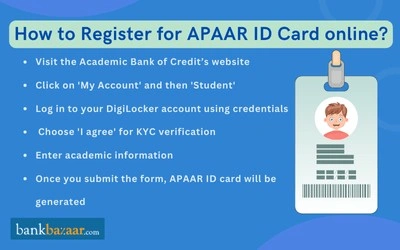
Method 1: Through Academic Bank of Credits (ABC Portal)
- Visit the official Academic Bank of Credits portal: abc.gov.in
- Click on “My Account” and then “Student.”
- Sign up using your mobile number and complete the verification process.
- Link your DigiLocker account for e-KYC using Aadhaar card.
- Provide your academic details related to college, school, or courses.
- Submit the information for verification.
- Once verified, your APAAR (ABC) ID is generated.
Method 2: Through DigiLocker
- Go to the Digi Locker website
- To create a Digi Locker account, click Login/Register and provide your address, mobile number, and Aadhaar card information
- Enter your login information to access your Digi Locker account
- Select Search Documents and look up Academic Bank of Credits
- Select APAAR/ABC ID Card
- Enter your academic and personal information, select Get Document, and check the consent box
- Your APAAR ID card will be generated after you submit the form
- To obtain your APAAR ID Card, select Issued Documents and then click the download icon next to the APAAR/ABC ID Card.
How to Download the APAAR ID Card
After completing the APAAR card registration process, students can download their cards. To download your APAAR ID card, follow these steps:
- Open the Academic Bank of Credits (ABC Bank) website and log in
- Find and select the APAAR Card Download option on the dashboard
- The screen will display your APAAR card
- Select Download or Print
- The download of your APAAR card will be completed.
Can’t find your APAAR card?
Check the “Issued Documents” section in your DigiLocker account. If it’s not available there, your school may not have completed the registration yet. Contact your school’s admin office or call the APAAR helpline at 1800 889 3511.
Why Having an APAAR ID Works in Your Favour?
- One ID for life: Your APAAR number stays with you from pre-primary school through higher education. You don’t need to re-register at every stage.
- All your records in one place: Marksheets, degrees, scholarships, sports achievements, and certifications are stored together, so you’re not digging through files every time you need a document.
- Instant verification: Colleges, employers, and scholarship providers can verify your credentials digitally, reducing the need for physical copies and attestation.
- Easier college admissions: When applying to institutions that support APAAR, your academic details can be accessed directly, saving time and effort.
- Smooth institution transfers: If you change schools or colleges, your academic records move with you, avoiding delays and paperwork.
- Better access to scholarships: Your verified academic profile makes it easier to apply for and receive eligible scholarships.
- Continuity if you take a break: If your education is interrupted, your APAAR record remains intact, making it easier to resume studies later.
Status of APAAR ID Card
Students can use the following methods to confirm their APAAR ID status:
- The district education office (for school-level IDs) or the school administration
- Once created, Digi Locker can be found under the Issued Documents section. If it doesn't show up, the organization can still be handling Aadhaar e-KYC or parental approval.
What’s the Difference Between APAAR ID and DigiLocker?
APAAR and DigiLocker are closely connected, but they are not the same thing.
DigiLocker is the platform where your documents are stored and accessed. APAAR, on the other hand, is your unique academic ID. When your APAAR ID is created through the Academic Bank of Credits system, your academic records and ID are automatically linked to your DigiLocker account.
Benefits of APAAR ID Card
The APAAR ID is an important step toward an organized academic experience for students since it provides the following benefits:
- Lifelong identity: The APAAR ID card serves as a student's lifelong identity number, allowing them to seamlessly track their academic progress and achievements
- Digital Academic Record Storage: Learning outcomes, test scores, report cards, health records, and extracurricular accomplishments like Olympiad rankings and specialized skill training while attending schools, degree colleges, junior colleges, and post-graduation will all be digitally stored and tracked in one location by the APAAR ID card
- Simplified Academic Transfers: Since it includes all the students academic information, it will make it easier for students to transfer between schools, guaranteeing a smooth educational experience for students across the country
- Dropout Tracking and Reconnection: It assists in keeping track of pupils who leave school so that the government can re-engage them in learning opportunities
- Credit Score for Education: Completed course credits will be automatically reflected and valid at all Indian universities thanks to the direct link between the APAAR ID and ABC Bank. Exams for university admission or higher education can be taken using the credit score produced by the APAAR ID
- Comprehensive Student Data: The APAAR card includes comprehensive student data, including name, residence, gender, date of birth, photo, sports participation, educational loans, scholarships, and awards.
FAQs on APAAR ID Card
- What if I lose my APAAR ID?
You can't permanently lose your APAAR ID since it's stored digitally in DigiLocker. To retrieve it, log in to DigiLocker using your Aadhaar-linked mobile number and find your APAAR card under "Issued Documents." If you've forgotten your password, use the "Forgot Password" option and verify via Aadhaar OTP. For further help, call the APAAR helpline at 1800 889 3511.
- What does APAAR stand for and What is it?
APAAR stands for Automated Permanent Academic Account Registry. This APAAR card, also referred to as an EduLocker, acts as a register for the education environment.
- How is APAAR different from Aadhaar?
Both are 12-digit IDs, but they serve different purposes. Aadhaar is a general identity proof for all Indian residents, while APAAR is exclusively for students to store and track academic records like marksheets, degrees, and skill certifications.
- Is an APAAR ID mandatory?
The Academic Bank of Credits (ABC Bank) issues the APAAR card, a digital ID card for students enrolled in both public and private institutions and universities throughout India. APAAR ID cards are not required; they are optional.
- What are the benefits of having an APAAR ID?
APAAR ID cards have many benefits like lifelong identification, tracking academic records, simplifying the student transfer process, government scheme benefits, and more.
- How to check the status of the APAAR ID card?
By asking their school officials, students can check the status of their APAAR ID card. They can obtain the APAAR ID from their DigiLocker account's "Issued Documents" section after it has been generated.
- What is the purpose of an APAAR ID Card?
The APAAR card allows students to monitor their academic progress and apply for admission to Indian schools, colleges, and universities.

Disclaimer
Credit Card:
Credit Score:
Personal Loan:
Home Loan:
Fixed Deposit:


Copyright © 2026 BankBazaar.com.